PUPCET 2010 Results

Saturday, February 27, 2010

PUPCET 2010: Sta. Mesa Campus

To see the results of PUPCET 2010, click this link or visit the following site.
[PUPCET 2010 Results :: http://www.pup.edu.ph/iApply/PUPCET2010.aspx]

The page only shows examinees who passed the PUPCET 2010.


Exam Dates:
PUP Sta. Mesa
December 13, 2009
January 31, 2010
February 7, 2010
READ MORE - PUPCET 2010 Results

Join IE8's Trivia Mania now and win prizes!

Sunday, January 17, 2010

Internet Explorer 8 Trivia Mania!

Click the picture for more infos! :)

IE8 Trivia Mania Contest Mechanics

  • Contest open to all participants in the Philippines
  • Participants must register and secure a username and password in ie8.ph
  • Participants will need to login at ie8.ph to join the Contest
  • Trivia of the Day will be posted on ie8.ph, Facebook Fan Page of windows7ako, @windows7ako in Twitter
  • Clues will be posted on @windows7ako in Twitter
  • The first eight (8) people who answers with the correct question gets the freebies
  • Participants will be asked to answer the trivia via (1) text or (2) video, or (3)picture
  • Correct answers should be in the right format specified in the question/ to be considered a winner
  • Only answers posted at ie8.ph will be considered
  • Direct posts to Facebook or Twitter does not count
  • Multiple posts will be counted as one, only the first post from the same registered participant will be considered
  • Participants can only win once a week, Trivia week is from Monday to Sunday
  • The decision of the winners by the Admin of ie8.ph is Final
  • Metro Manila winners will need to claim their prize at the Microsoft Head Office in Makati
  • Provincial winners will be sent their prizes via courier
  • Trivia ends Februay 17, 2010!

READ MORE - Join IE8's Trivia Mania now and win prizes!

Unfollow a BLOG in 3 easy steps in Blogger.com

Wednesday, January 13, 2010

Unfollow a BLOG in 3 easy steps in Blogger.com

1) Under the reading list, click MANAGE button.
2) Look for the blog that you want to unfollow. Then click the SETTINGS (on the right side of the title of the BLOG you want to unfollow).
3) A pop-up window will appear. Click the "STOP FOLLOWING THIS SITE".

And that's it!
READ MORE - Unfollow a BLOG in 3 easy steps in Blogger.com

On Facebook, there is no Santa Claus

Wednesday, December 23, 2009

"Click through the prompts to watch the video and you'll be greeted not with an animated reindeer or snowman but rather a virus, a variant of the Koobface worm, which began making the rounds on social networks about a year ago."

The hottest breeding ground for malware today is Facebook, and with the arrival of the holidays, virus activity is heating up.

The latest involves a greeting from the man in red himself: One "***SantA***," who promises entertainment in the form of a holiday video posted to your wall.

You know how this ends. Click through the prompts to watch the video and you'll be greeted not with an animated reindeer or snowman but rather a virus, a variant of the Koobface worm, which began making the rounds on social networks about a year ago.

Ultimately if you do click through the fake plugin installation prompts you'll be infected with a virus that perpetuates itself through your activity: You'll be presented with a captcha (those funky images or words that you have to type correctly to prove you're human) that makes it possible for the SantA virus to spread further. Fail to enter the text and your computer will simply stop working.


READ THE FULL ARTICLE HERE: http://tech.yahoo.com/blogs/null/158158;_ylt=AuEuxaKwtyxzqfycr0JmfhsWLpA5
READ MORE - On Facebook, there is no Santa Claus

Goodbye Microsoft Word?

"Microsoft Word is now scheduled to be prohibited from sale beginning January 11, 2010."

Office workers of America, enjoy your Christmas break. Because come the new year, things could get a little hairy around the office. Microsoft Word is now scheduled to be prohibited from sale beginning January 11, 2010. That's less than three weeks away. The good news: Microsoft has promised a fix, one which will be rolled out before the deadline arrives.

If you don't understand, you might have simply missed this story, or dismissed it as something that Microsoft would ultimately use its considerable clout to have pushed under a legal rug.

But it's no joke. In August of this year, a court sided with a small Canadian company called i4i that holds a 1998 patent on the way the XML language is implemented, finding that Microsoft was in violation of that patent. The result: Microsoft was told to license the code in question from i4i or reprogram it, or else Microsoft Word would have to be removed from sale in the market. The original ruling gave Microsoft until October to get its legal affairs in order, but appeals pushed that out a bit.


READ MORE - Goodbye Microsoft Word?

Windows7Ako

Tuesday, December 22, 2009


"Want to see what's happening with Windows 7 in the Philippines? Become a fan and join our fast growing community! Get scoops on the latest, tips, tricks and moreover get your hands on those Windows 7 freebies! :D" - WINDOWS7AKO:http://www.facebook.com/windows7ako
READ MORE - Windows7Ako

Use Windows Disk Cleanup Utility to Free Hard Drive Space

Wednesday, December 16, 2009

windows7logo thumb Use Windows Disk Cleanup Utility to Free Hard Drive Space

Are you looking to free up a few megabytes of space on your hard drive? Then you should check out Windows 7’s handy disk cleanup utility.Start off by typing Disk Cleanup in the Start Menu search box and hit return.

diskcleanupmenuitem thumb Use Windows Disk Cleanup Utility to Free Hard Drive Space
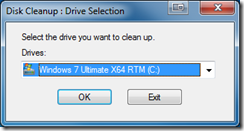
This will start the utility and you will be presented with a dialog box. Select the hard drive you want to clean up using the drop down box:

diskcleanup1 thumb Use Windows Disk Cleanup Utility to Free Hard Drive Space

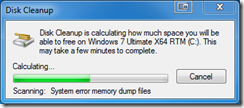
When you hit OK the utility will search the hard drive you selected to find files to possibly remove.

Note: It does not remove files automatically – you have to tell it later to do that so don’t worry about running the utility at this stage – nothing is being removed so far.

diskcleanup2 thumb Use Windows Disk Cleanup Utility to Free Hard Drive Space

Here the utility is searching the hard drive you selected. When it is complete it will show you this dialog box:

diskcleanup3 thumb Use Windows Disk Cleanup Utility to Free Hard Drive Space

As you can see it has initially identified 155MB of files to possibly be removed. That total size is based on which categories of files have their check box selected to indicate you want to remove those files.

The following screen shots show you some of the other file categories you can possibly select to remove those files – they are not checked by default:

diskcleanup4 thumb Use Windows Disk Cleanup Utility to Free Hard Drive Space
diskcleanup5 thumb Use Windows Disk Cleanup Utility to Free Hard Drive Space
diskcleanup6 thumb Use Windows Disk Cleanup Utility to Free Hard Drive Space


As you click on each listing the main dialog box will explain what those files are related to in order to assist you in deciding to remove them or not.

If you choose Clean up system files then you will remove files for all users on the PC your working on. If your desperate for more space that might be necessary. The other users can always run this utility under their own login as well to clean up files.So once you have everything picked that you wan tot delete then hit the OK button and then confirm you want to perform the deletions:

diskcleanup7 thumb Use Windows Disk Cleanup Utility to Free Hard Drive Space

Key word there is permanently – these files do not go to the Recycle Bin.

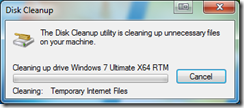
diskcleanup8 thumb Use Windows Disk Cleanup Utility to Free Hard Drive Space

Here you can see the utility is carrying out the file cleanup based on your selections. Once it is done there is no confirmation dialog of any kind – it just goes back to your desktop.

This should help you free up a few megabytes of space on your system.
READ MORE - Use Windows Disk Cleanup Utility to Free Hard Drive Space

YM: How to change the details about my mobile device?

Saturday, December 12, 2009

I was trying the Yahoo Messenger Mobile's Feature when I decided to edit my number so I can receive IMs from my other phone. It's my first time to try it and I really don't know what to do, so I searched in Yahoo and I found the answer to my problem. Here it GOES:

How can I change the details about my mobile device?

You can edit your mobile device information in Yahoo! Messenger so you can stay connected through Yahoo! Mobile Services. To edit your mobile device number you first have to delete it from Yahoo! Messenger by following the instructions below.

Here's how to delete your mobile device:

1. Click the Messenger menu.
2. Select Preferences.
3. Click the General category.
4. Click Edit mobile device and enter your Yahoo! ID and password to sign in to Yahoo! Mobile.
5. Under the "Other Mobile Devices" section, click the trash can icon to the right of the device.
6. Click Delete.

Now that you have deleted your mobile device, you can now add your new mobile number to Yahoo! Messenger by following the instructions below:

1. In Yahoo! Messenger on your computer, click the Messenger menu.
2. Select Preferences.
3. In the "Yahoo! Messenger Preferences" window, select General.
4. Click the Edit mobile phone button.
5. A pop up window will appear where you will enter your new mobile device number.
6. Follow the prompts until your new mobile device is registered.


SOURCE: http://help.yahoo.com
READ MORE - YM: How to change the details about my mobile device?

Turbo C++ Version 3.0

Friday, December 11, 2009

Turbo C++ was a C++ compiler and integrated development environment (IDE) originally from Borland.


C Language Compiler Download
READ MORE - Turbo C++ Version 3.0

Facebook Anthem

The "Facebook Anthem" is a viral music video produced in 2008 which features an array of everyday people singing a parody of Billy Joel's "We Didn't Start the Fire" with a chorus of "I'm Getting Bored with Facebook". The song's lyrics lament the explosion of Facebook applications, polls, quizzes, and features.


Lyrics

Facebook is a crime
When people have too much time
Sending me requests
IQ and brain tests
It's no f**king joke
I don't like to Super Poke
Scrabulous, Hotness
Update my status...

CHORUS
I'm getting bored of Facebook
So don't invite me
Throw a sheep
Or bite me

Please don't hug me
Give me your Graffiti
Hot or not?
So what?
I don't want to know.

Movie Quiz
S*x Quiz
Stu*id Johnny Depp Quiz
Family Guy
Which one am I?
They all have to go.

Pirates and Zombies
I really hate these
Sticky notes
Horoscopes
Join in the chorus please!

CHORUS
I'm getting bored of Facebook
So don't invite me
Throw a sheep
Or bite me

I hate applications
There are far too many
And I don't use any

Which Princess am I?
Send another Valentine
Group Request
Likeness Test
Will this ever stop?

Cute vs sexy
Colours represent me
Free Gifts
What's this?
Now that really takes the p*ss

Oh no
f**k me
Another Fortune Cookie
Texas Hold'em
I think I'm gonna fold

Friends for sale
Compare me
How many more can there be?!
Super Wall
Fun Wall
Drives me up the F**KING WALL!

I'm getting bored of Facebook
So remove the friends
Who drive you round the bend
Delete Applications
There are far too many
And they just keep going
On and on and on and on...
READ MORE - Facebook Anthem


Labels

Labels

Labels